Showing posts with label database. Show all posts

Friday, October 30, 2009

SQL Server Database Transaction Log Full

Problem

Your SQL Server database returns an error that your transaction log is full when you try to execute some SQL statements. You check the hard drive free space, and it's full; or perhaps the transaction log has reached its maximum configured size. You check your database's recovery model, and it's set to "Full", even though restoring from a previous night's backup is acceptable recovery in the event of failure.

Solution

Unless you change the default log file settings or database recovery model, the transaction log is a ticking time bomb that grows until disk space is full, rendering your database unusable. This quick solution makes space immediately available, and the long-term solution automates the clean-up of the transaction log file.

The quick solution
The quick solution, after ensuring you have backed up your database as needed, is to execute the following statements in SQL Studio to (1) remove all inactive logs from your database's transaction log, then (2) shrink the log file down to a reasonable size.
  1. Purge all inactive logs from a database:
    BACKUP LOG <YourDBName> WITH TRUNCATE_ONLY

    For example:
    BACKUP LOG XyzWebsite WITH TRUNCATE_ONLY

  2. Shrink the database's log to a certain number of MB:
    DBCC SHRINKFILE(<YourDBLogFileName>, <NumMegabytes>)

    For example, shrink the log to 100 MB:
    DBCC SHRINKFILE(XyzWebsite_log, 100)
Do not shrink frequently, as physical fragmentation impacts database processing time; so after doing this, consider the long-term solution to prevent this from happening again.

The long-term solution
The long-term solution to automatically purge inactive logs is to change the database recovery mode from "Full" to "Simple". As long as restoring from a previous night's full database backup is acceptable recovery for you: in SQL Studio, right-click the database, select Properties ► Options, then change Recovery model to Simple.

For further reading, see the following MSDN references:

Thursday, November 20, 2008

ADO Timeouts: Connection vs. Command vs. RecordSet

The Problem

An interesting bit I learned today is that if you need to extend the time limit for an intensive SQL query or procedure executed using ADO, setting only the commandTimeout property of your ADODB.Connection instance is not sufficient. You will see that you have extended the connection time limit, but queries will still time out within the default limit of 30 seconds.

Example
Using VBScript in ASP 3:
set con = createObject("ADODB.Connection")
con.open connectionString
con.commandTimeout = 60

set command = createObject("ADODB.Command")
command.activeConnection = con
command.commandType = adCmdText
command.commandText = sql
command.execute
response.write command.commandTimeout 'Actually 30 (the default).

The Solution

You must also set the commandTimeout property on the ADODB.Command or ADODB.Recordset being used. Otherwise those objects will use the default time limit of 30 seconds because they do not inherit the time limit from the associated ADODB.Connection instance.

Example
Using VBScript in ASP 3:
set con = createObject("ADODB.Connection")
con.open connectionString
con.commandTimeout = 60

set command = createObject("ADODB.Command")
command.activeConnection = con
command.commandType = adCmdText
command.commandText = sql
command.commandTimeout = 60
command.execute
response.write command.commandTimeout 'This is now 60 seconds.

See this Microsoft Tech Note for more.

Tuesday, November 4, 2008

Inter-database Communication is Easy in T-SQL

Problem

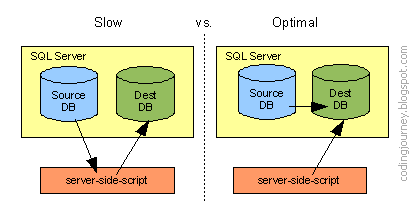
You need to obtain data from one data source to process and store in another. You don't want your server-side-script to use two connection objects and be the slow middle-man between them, as in the diagram on the left.

Slow with two SQL Server connections and scripting vs. Optimal with only one connection.


Solution

If both data sources are databases on the same MS SQL Server, it's a piece of cake to do optimally with just one connection object and pure T-SQL.

Just do the following:
  1. Set up Security - Add the user of the destination database as a user of the source database with at least db_datareader access.

  2. Prefix foreign tables with Schema - In your SQL that writes to the destination-database, prefix all tables housed in the source(foreign)-database with their "fully qualified" position in the schema to indicate which database they reside in, as illustrated in the example below.

    Example
    Table tblSource is from of the ForeignDB database, but tblDestination is from the active database.
    insert into tblDestination (colA, colB)
    select col1, col2
    from [ForeignDB].dbo.tblSource

Wednesday, October 15, 2008

Zinc Crashes on Select from Database

Background

I'm using Zinc 3 as a wrapper around a Flash 9 / ActionScript 3 application for a touch-screen kiosk that requires database and comport access.

Problem

The Zinc application crashes when calling mdm.Database.ADO.getData() to obtain the results of a query (either SELECT or stored procedure) executed by mdm.Database.ADO.select() IF the query produces an empty result set. I'm connecting to a MS SQL Server 2005 database, but this issue probably happens with any ADO connection.

Example
mdm.Database.ADO.select(sql); //if this results in 0 records...

if (mdm.Database.ADO.error())
   throw("handle error here");
else
   arr = mdm.Database.ADO.getData(); //crashes here

Solution

The undocumented but simple way to prevent the crash is: prior to calling getData(), you must first check ensure that getRecordCount() is not zero.

Example
mdm.Database.ADO.select(sql);

if (mdm.Database.ADO.error())
   throw("handle error here");
else if (mdm.Database.ADO.getRecordCount() == 0)
   arr = [];

else
   arr = mdm.Database.ADO.getData();

Conclusion

Ideally Zinc would just return an empty array if no records were found, but since it doesn't, it's nice to know there is an easy fix. I am content with minor problems like this because the benefits Zinc offers - including access to databases and the comport directly from Actionscript - far outweighs the bugs it has.