Friday, October 30, 2009

SQL Server Database Transaction Log Full

Problem

Your SQL Server database returns an error that your transaction log is full when you try to execute some SQL statements. You check the hard drive free space, and it's full; or perhaps the transaction log has reached its maximum configured size. You check your database's recovery model, and it's set to "Full", even though restoring from a previous night's backup is acceptable recovery in the event of failure.

Solution

Unless you change the default log file settings or database recovery model, the transaction log is a ticking time bomb that grows until disk space is full, rendering your database unusable. This quick solution makes space immediately available, and the long-term solution automates the clean-up of the transaction log file.

The quick solution
The quick solution, after ensuring you have backed up your database as needed, is to execute the following statements in SQL Studio to (1) remove all inactive logs from your database's transaction log, then (2) shrink the log file down to a reasonable size.
  1. Purge all inactive logs from a database:
    BACKUP LOG <YourDBName> WITH TRUNCATE_ONLY

    For example:
    BACKUP LOG XyzWebsite WITH TRUNCATE_ONLY

  2. Shrink the database's log to a certain number of MB:
    DBCC SHRINKFILE(<YourDBLogFileName>, <NumMegabytes>)

    For example, shrink the log to 100 MB:
    DBCC SHRINKFILE(XyzWebsite_log, 100)
Do not shrink frequently, as physical fragmentation impacts database processing time; so after doing this, consider the long-term solution to prevent this from happening again.

The long-term solution
The long-term solution to automatically purge inactive logs is to change the database recovery mode from "Full" to "Simple". As long as restoring from a previous night's full database backup is acceptable recovery for you: in SQL Studio, right-click the database, select Properties ► Options, then change Recovery model to Simple.

For further reading, see the following MSDN references:

Tuesday, October 20, 2009

Asian languages do not display in IE8/XP

The Problem

Asian language characters (i.e. Chinese, Korean, Japanese, Thai, Vietnamese) render as rectangles/boxes in Internet Explorer 8 on Windows XP. The glyphs display correctly in IE7 and FireFox.

Chinese characters in IE8 before and after the solution
Click here to jump right to The Solution, or read on for a brief analysis.

The Analysis

There are two inconvenient client-side workarounds; neither is a real solution. Microsoft states a per-page workaround, but it does not work for me.

The first client-side workaround is to click the "Compatibility" button to tell IE8 to re-render the page using the IE7 rendering engine. This would require your users to click this button in order to view your site, which is not user-friendly. Also, text in HTML <select> boxes is still rendered as boxes.

IE8 Compatibility button
The second client-side workaround is to right-click the page and select:
Encoding ► More ► <problematic language>. The problem with this approach is: the encoding does not "stick"; you must re-select it for each page, and text in <select> boxes is still no different.

IE8 Encoding context menu
Microsoft's IE8 Readiness Toolkit states a per-page fix: add the following meta tag to tell IE8 to render the page like IE7. However when I add this tag, all characters still look like boxes, so this does not work.

<meta http-equiv="X-UA-Compatible" content="IE=EmulateIE7"/>


The Solution

There are two solutions:
  1. Solution 1 requires a web-server change; Asian characters in <select> boxes
    will not display correctly.
  2. Solution 2 requires a client-side Windows Control Panel change; all Asian text will display correctly.
Solution 1: Web Server Change
Add to your web server an HTTP response header which instructs IE8 to render the page using the old IE7 renderer. Note: Asian characters displayed in HTML <select> boxes will not render in IE8 nor IE7; if you need that to work, skip to Solution 2.

The HTTP header that fixes IE8 Asian characters in all text except <select> boxes:
X-UA-Compatible: IE=EmulateIE7

Solution 2: Windows Control Panel change
Microsoft has tied Internet Explorer 8 directly into your computer's Regional & Language Support settings. This makes sense, but it's unfortunate for IE since Asian languages work out-of-the box with other web browsers.

To view Chinese, Korean, Japanese and other East Asian languages in all text on web pages in both IE8 and in IE7, follow this. In Windows XP go to:

Control Panel ► Regional and Language Options ► Languages

Check the "Install files for East Asian languages" option, insert your Windows XP CD-ROM, and restart when it's done:

Windows XP Regional and Language Options - Install files for East Asian languages
编码快乐!
해피 코딩!
ハッピーコーディング!
Happy coding!

Thursday, August 27, 2009

Screen and Print styles in the same CSS file

Until today, I was under the impression that to vary the styles used for HTML displayed on screen vs. printed to paper, one had to create distinct CSS files for screen and print, and use two separate <link> tags, a-la:

<link rel="stylesheet" href="styles_screen.css" />
<link rel="stylesheet" media="print" href="styles_print.css" />


However I found out today that you can actually just use one CSS file, and separate your media usage with the special @media selector. Simply enclose style definitions by media type, as in this simplified example:

h1
{
   font-family: Verdana;
}
@media print
{

   h1
   {
      font-family: Times;
   }
}


Nothing revolutionary, but cool to know you can save a separate HTTP file request by combining all your CSS into one file.

Saturday, August 15, 2009

Debugging the Kitchen Sink

In this post, I explain the debugging process, difficulties novice developers have with it, and present a practical non-computer-programming example of applying it to debug a problem with my kitchen sink's faucet.

The Debugging Process

"Debugging" is a vital skill in the software development world that a is used quite often to solve programming problems, ranging from simple logic mistakes to difficult-to-repeat concurrency race conditions or deadlocks.

However the process of debugging is an implementation of a generic, logical, and scientific problem-solving process which is applicable well beyond computer programming. That process is simplified as:
  1. Establish an observable problem.
  2. Test to determine all of the specific scenarios where the problem is observed.
  3. Understand the major components involved.
  4. Hypothesize what could be causing the problem.
  5. Locate the problem.
  6. Make changes to resolve the problem.
  7. Test all specific scenarios where the problem happened to confirm the problem is solved.

Difficulties with the Debugging Process

I have often observed that novice developers encounter difficulties in applying this process, by halting as soon as actual results are not the same as expected results. When they come asking "What do I do?" my answer, if not "Check the Reference" will always be, "Debug it".

The difficulty of understanding this process seems to be with Step 5 - Locate the problem, which rightfully may be a time-consuming process. With a "syntax error", the compiler/interpreter usually tells you exactly where the problem lies, so it is an easy fix. But with a "semantic error", meaning it's a programming or design mistake has caused unintended results, you must gradually narrow down the source of the problem over many iterative tests starting from the general range of what works, and gradually running more specific tests, ending at the actual source of the problem.


To illustrate the debugging process in a practical non-computer-programming, example -- just this morning I applied it to a household problem that has been nagging me for quite some time.

Application: The Kitchen Sink's Faucet

A few years ago when I moved into my house, I replaced the kitchen sink's faucet, an old two-knob fixed-faucet type, with a new single-handle pull-out model. However when I was finished there was a problem: the cold water pressure was significantly lower than the hot water pressure. I finally got around to working on this, and applied the same debugging process, as follows.
  1. Establish an observable problem.
    The problem is that when the handle is pushed all the way to the cold side, the water is very slow, but when all the way to the hot side, the water is very fast.

  2. Test to determine all of the specific scenarios where the problem is observed.
    In this case, the above is the only observable scenario.

  3. Understand the major components involved.
    The major components are:
    1. the faucet's output
    2. the faucet's hot and cold water intakes
    3. the 2 tubes connecting the wall outlets to the faucet intakes
    4. the hot and cold wall outlets

    This diagram illustrates how the components are connected and the direction of water-flow.

    Activity Model of Faucet Components
  4. Hypothesize what could be causing the problem.
    My two bathroom sinks have no problem with the water pressure from either hot or cold lines. Based on that I will rule out the wall outlets. Also, since the hot water pressure from the faucet output is just fine, I will rule that out.

    That narrows down the range of the problem to one of the two remaining components:
    1. the faucet's output
    2. the faucet's hot and cold intakes
    3. the 2 tubes connecting the wall outlets to the faucet intakes
    4. the hot and cold wall outlets

  5. Locate the problem.
    1. First I want to see if the problem exists in the faucet's hot and cold intakes. I know that hot is fine, but cold is low, so my test was to switch the connections between the intakes and the tubes, causing hot water to come out when the faucet is turned to cold, and vice versa. If the cold water pressure becomes good but hot becomes poor, then the problem exists in the intakes:


      The results of this test however are that the pressure is unchanged - hot is still good and cold is still poor. So the intakes are not the problem. I scratch that off the list:
      1. the faucet's output
      2. the faucet's hot and cold intakes
      3. the 2 tubes connecting the wall outlets to the faucet intakes
      4. the hot and cold wall outlets

    2. If my hypothesis is correct, the problem must exist in the tubes. To test this, I undo the tube switch from the previous test, and now swap the tube connections with the wall outlets. Now, if the cold water pressure becomes good but hot becomes poor, then the problem exists in the tubes:


      The results of this test are that the cold water pressure is now good, but the hot water pressure is poor. Thus, this test proves that the problem exists in the Cold Water Tube.

  6. Make changes to resolve the problem.
    Since I cannot get into the cold water tube to find out what is wrong with it, my next step is to replace the defective tube with a new one from the store.

  7. Test all specific scenarios where the problem happened to confirm the problem is solved.
    Once I buy my new tube, I will install it and test to make sure that the cold water pressure is now the same as the hot water pressure.

As you can see, the process of debugging can be applied to any problem, computer-programming or otherwise, as long as you have a general understanding of the components involved, how they interact, and if you can follow and logical and scientific thought-process.

Friday, August 14, 2009

CPU fans running loudly and constantly

The Problem

For the last few days, I have noticed both of my CPU fans on my Gateway / AMD Phenom Quad Core / Windows Vista machine have been running loudly and constantly, even when I don't have any applications open. My CPU fans are not dusty.

This seemed to coincide with either a boatload of Windows Updates I installed a few days ago, or my installation of Microsoft Visual Studio 2008 (for my upcoming Mobile Development class) and its subsequent service packs.

The Solution

It turns out the loud CPU fans are directly related to the configured Power Options in the Windows Control Panel.

My Power Plan was set to "High Performance". The very instant I changed the this to either "Power saver" or "Balanced", the CPU fans ceased or became very muted.

Windows Vista Power Options Control Panel
These settings state that processor performance will be reduced, but for now I will leave this as-is to see if I notice any difference, and who knows, this might show up as savings on the utility bill!

Utilitarian Friday: "Carbonite" Computer Backup

What would you do if one day all of your digital photos, digital music, and digital documents were just -- gone?

What are your backup plans?

One evening a couple years ago, I left my laptop charging directly in the wall outlet. The next morning, it was fried from a power surge. Fortunately I was able to extract the hard drive and retrieve my data from it by using a special laptop-harddrive-to-IDE cable to attach to my desktop PC. It could have been worse. Now I make sure everything important is always plugged into surge protectors.

A couple years prior to that, my external hard drive that contained my music, pictures, freelance files and other important files, started making whirring and clicking sounds after 5 or 10 minutes of being turned on, before automatically shutting down. Fortunately for me again, I was able to copy files away from it in batches before the shutdown. It could have been worse.

My most recent backup solution was to copy all of my music and pictures to DVDs that now sit collecting dust on my shelf in the event that they are needed. This is definitely a good plan, but the last time I did that was at least a year ago. Plus, what if there is a fire or burglary? There must be an easier way.

Carbonite

Enter Carbonite, a very inexpensive, off-site, automatic, and secure file backup and restore service. It is highly-rated and works on both Windows and Mac platforms.
Secure
This is obviously an important factor when giving a third-party access to your private documents. Carbonite states:
We encrypt your files twice before backing them up securely offsite, using the same encryption techniques that banks use. Files remain encrypted at our secure data centers, so only you can see them.
Automatic
It knows what to backup and what not to back up. Music, pictures, documents, your desktop, etc. It runs in the background for a few days for one big initial backup. Then once it is done, it automatically backs up only new or changed files. The handy status window available from the System Tray shows you the current progress and the files that are currently backing up:


Customizable
It is very easy to tell Carbonite what files/folders you do and do not want backed up. It integrates with Windows in two ways:
  1. Dots in the bottom left corner of icons.
    • No dot means it will not be backed up
    • A Yellow dot means backup is pending
    • A Green dot means it has been backed up
    • A donut means that a folder contains some files that are to-be-backed-up and some that are not to be backed up.

  2. The right-click context menu for files and folders contains a new "Carbonite" item that allows you to change the backup options:
    • Don't back this up
    • Back this up
    • Back this up as soon as possible, to bump up a pending backup in the queue

Easy to Restore
Once your files are backed up, how easy is it to restore? Very. Carbonite shows up in Windows Explorer as if it were another hard drive. Simply browse your Carbonite drive, right-click on the files or folders you want to restore, and you can restore to the same location, restore to another location, or restore previous versions.


15 Day Free Trial
Download Carbonite here. You'll get a free 15 day trial. Then for unlimited backup, it is $55 per year, or even less if you sign up instead of the trial or buy for more than 1 year at at time. Oh and I get 3 months of backup free if you sign up ;)

To me, the peace of mind of knowing my important files are securely backed up at all times is well worth the price. What are your backup plans?

Friday, August 7, 2009

Utilitarian Friday: "KeePass" Password Safe

After several months without many brick-wall coding problems to document, I'd like to start a mini-series called Utilitarian Friday to showcase many essential free software utilities that I use every day to increase my productivity. Not only are these useful to coders, but to the power computer-user alike.

Let's begin with KeePass - the Password Safe!

KeePass

KeePass is an easy, secure way to control your passwords using a flash drive or your local machine.

If you suffer from any of these conditions, KeePass is for you:
  • same-password-for-everything syndrome
  • I-can't-find-the-blasted-post-it-note-itis
  • I-thought-it-was-PA$$W0RD-but-maybe-it-was-P7S$WOR3-disfunction
There are 5 key features KeePass delivers for me: security, organization, ease-of-use, password generation, and a good deal (free!).

I. Security
How are stored passwords kept secure?
  1. The software is open-source, so you can ensure for yourself that it's not doing anything fishy.

  2. The master password, required to use your KeePass, is hashed with the very secure SHA-256 algorithm. Both the passwords stored and the utility's database itself are encrypted using the AES and Twofish ciphers -- which are ciphers used by banks.

    According to the makers of KeePass:
    "Even if you would use all computers in the world to attack one database, decrypting it would take longer than the age of the universe."
  3. When running in memory, passwords are still encrypted.

  4. Set KeePass to lock when minimized, and any subsequent access requires entry of your master password.

II. Organization
Set up a tree of Password Groups, assign little icons to each group, and it is so easy to find your passwords.

For example my KeePass, below, contains "folder" groups for: personal stuff, my full time job, and my freelance job. Then I organized those into type of passwords such as FTP, RDP, VPN, Live Sites, Dev Sites, etc.


While others are struggling to locate passwords by shuffling through physical folders and papers, or thinking back through fading memories, KeePass makes it a no-brainer.

III. Ease-of-Use
So once your passwords are stored, how to you use them? There are 3 ways.
  1. In your web page or application, click on the username text box, then press Ctrl + Alt + A. KeePass automatically enters your username, password, and submits the form. It can do this because it's aware of the title bar of the active window, using that to find a match in your password database.

  2. If no exact match is found or if the web site you are using does not have useful or consistant title bar text, press Ctrl + Alt + K to bring KeePass to focus, browse for your password record, click on it, then press Ctrl + V and it will auto-type in the window that last had focus - starting from the text box that last had focus.

  3. If you just need to copy and paste the password itself, in KeePass click on the password record and simply press Ctrl + C to have the password copied to the clipboard for 10 seconds.

Additionally, KeePass is a tiny application, less than 1MB, that you can easily carry around on your USB flash drive, and keep back-up copies on your home computer and work computer in case you lose or forget your flash drive.

IV. Password Generation
The great thing with KeePass is that if there is a password that you do not *need* to commit to your brain's memory, you can use the built-in password generator, to automatically make long, secure passwords for you to use.


This especially comes in handy for services that require you to change your password periodically.

V. A Good Deal
As with much of the open-source world, this price of this utility is FREE! Since this is not a remote service, there is no monthly fee or anything of the sort.

Download It Already!
Get KeePass now from its official web site or from its SourceFourge project page:

Stay tuned to next week's Utilitarian Friday for another review of an essential software utility!

Friday, April 17, 2009

"Permission Denied" Error in ADL SCORM 1.2 Test Suite

Yesterday I needed to verify that an older release of my Flash-based e-learning course-shell is indeed SCORM conformant -- specifically to the old-but-widely-used SCORM 1.2 standard. This conformance test is done using the ADL SCORM 1.2 Test Suite -- a locally-run web application that simulates the run-time environment of a SCORM-compliant Learning Management System.

The Problem

When launching this SCO in the ADL Test Suite in IE7 on Windows XP SP3, a JavaScript error alerts simply "Permission denied". This error happens when the SCO first locates the test suite's SCORM 1.2 API, so the conformance test cannot even start.

Since the test suite is a local web application (using only HTML, JavaScript, and a Java Applet) local web browser security restrictions apply. Because of this, I always copy my test SCOs into a new folder within the Test Suite folder on my C drive to prevent any potential "cross-domain" (cross-local-folder) security issues. But that does not solve this problem.

I noticed something odd when opening-with Notepad the JS file in my SCO that is responsible for finding the API -- Windows opens a curious confirmation box informing me that the internet can be useful but this file could harm my computer:

'Open File - Security Warning' dialog box with 'While files from the internet are useful, this file type can potentially harm your computer. If you do not trust the source, do not open this software.'
This is strange, because when I create a new JS file then open-with Notepad, no such warning appears.

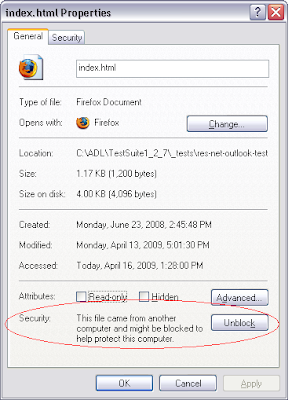
It turns out Windows now flags files as "obtained from the internet" or not.

The Solution

This new Windows security restriction is the cause of this "Permission Denied" error message. Internet Explorer now blocks the scripting between downloaded local files and locally-created local files, in the same fashion as its blocking of cross-site-scripting.

The solution is to modify the properties of each individual file in the SCO to remove this "downloaded-from-the-internet" flag. At the very least, do this to the containing HTML file and the JS files it uses. Click the "Unblock" button on the File Properties window:

File Properties window with 'Unblock' button and 'This file came from another computer and might be blocked to help protect this computer.'
Unfortunately there is no apparent way to "Unblock" in bulk -- you must do it on a file-by-file basis.

One More Solution
If you clicked "Unblock" on all of your files but you still get this Permission Denied error, there is one more thing to check -- especially if your SCO's HTML file is published from Flash.

Flash HTML Publish settings by default throw a special HTML comment-block at the top of the HTML file that looks like this:

<!-- saved from url=(0013)about:internet -->

If your SCO contains that comment, IE will behave the same way as the previous case by blocking the scripting between this "saved-from-the-internet" file and the test suite API. Just delete that comment block and you will be good-to-go.

Friday, April 3, 2009

Escaped Newline not properly rendering from XML

When setting a Flash TextField's text to some data that is loaded from an external XML file, I noticed the newline characters defined in my XML file, "\n", were being rendered as the string "\n" rather than an actual line-break.

The Problem

Here is a simplified example of this situation:

The XML file
<root test="Line1\nLine2\nLine3"></root>

The ActionScript
var xml:XML = new XML();

xml.load("slash-n.xml");

xml.onLoad = function()
{
   var testAttr:String = this.firstChild.attributes.test;

   trace(testAttr);
   //this traces: Line1\nLine2\nLine3

   trace("Line1\nLine2\nLine3");
   //this traces:
   //Line1
   //Line2
   //Line3

   trace(testAttr.indexOf("\\n"));
   //this traces: 5
};

This example illustrates that the first trace, using the externally-loaded string, actually outputs "\n", whereas the second trace renders the newline characters in the string literal as line-breaks.

The problem here is that the XML class actually escapes slashes it sees by doubling them up, as in "\\n". This behavior is observed in the third trace which shows that "\\n" exists in the string.

The Solution

There are two ways to solve this -- a quick way and a better way.

A Quick Solution - ActionScript Change
The quick way to solve this, leaving the XML as-is, is to simply replace "\\n" with "\n" after the XML load:

ActionScript now replaces "\\n" with "\n"
var xml:XML = new XML();

xml.load("slash-n.xml");

xml.onLoad = function()
{
   var testAttr:String = this.firstChild.attributes.test;

   testAttr = testAttr.split("\\n").join("\n");

   trace(testAttr);
   //this now traces:
   //Line1
   //Line2
   //Line3

};

This solves the problem.

But what if our attribute needs to contain other special characters such as a less-than/greater-than signs or double-quotes? Those must be escaped using the entities &lt; &gt and &quot;, and with a lot of those in the XML, this hinders readability and, if the file is being managed by hand, also hinders writability. A better way would be to use a XML CDATA block instead of an XML attribute.

A Better Solution - ActionScript and XML Changes
This solution takes advantage of the CDATA block, whose contents are not parsed during the XML load, thus not requiring us to escape less-than/greater-than signs and double-quotes.

The ActionScript XML class still doubles-up slashes so we will still need to replace "\\n" with "\n", but our XML file will have higher readability and writability.

Before: XML attribute leads to low readability/writability
<root test="&quot;Line1&quot;\n&gt;&gt;Line2\n&lt;Line3&gt;"></root>

After: XML changed for higher readability/writability
<root><![CDATA["Line1"\n>>Line2\n<Line3>]]></root>

ActionScript refers to CDATA block and replaces "\\n"
var xml:XML = new XML();

xml.load("slash-n.xml");

xml.onLoad = function()
{
   var testCdataText:String = this.firstChild.firstChild.nodeValue;

   testCdataText = testCdataText.split("\\n").join("\n");

   trace(testCdataText);
   //this traces:
   //"Line1"
   //>>Line2
   //<Line3>

};

This solves the newline problem while also increasing the readability and writability of the XML.

Wednesday, February 4, 2009

ExternalInterface vs. JS function returning empty-string

The Problem

I have a JavaScript function that always returns a string, but in some cases it needs to return an empty-string. I have Flash, using ActionScript 2, call this function using ExternalInterface.call, but surprisingly when the return value of the JavaScript function is empty-string, ExternalInterface.call returns the 4-character string: "null". If using ActionScript 3, the value null is returned instead of the string.

Example
JavaScript:
function test(bln)
{
   return (bln ? "some text" : "");
}

ActionScript:
import flash.external.*;

ExternalInterface.call(
    "alert",
    "'" + ExternalInterface.call("test", true) + "'");
    //alerts: 'some text'

ExternalInterface.call(
    "alert",
    "'" + ExternalInterface.call("test", false) + "'");
    //alerts: 'null'


The Solution

The workaround is to detect "null" or null and replace it with empty-string, as in these examples:

ActionScript 2 workaround
import flash.external.*;

var x = ExternalInterface.call("test", false);

if (x == "null")
    x = "";


ExternalInterface.call("alert", "'" + x + "'"); //alerts: ''

ActionScript 3 workaround
import flash.external.*;

var x = ExternalInterface.call("test", false);

if (x == null)
    x = "";


ExternalInterface.call("alert", "'" + x + "'"); //alerts: ''

Thursday, November 20, 2008

ADO Timeouts: Connection vs. Command vs. RecordSet

The Problem

An interesting bit I learned today is that if you need to extend the time limit for an intensive SQL query or procedure executed using ADO, setting only the commandTimeout property of your ADODB.Connection instance is not sufficient. You will see that you have extended the connection time limit, but queries will still time out within the default limit of 30 seconds.

Example
Using VBScript in ASP 3:
set con = createObject("ADODB.Connection")
con.open connectionString
con.commandTimeout = 60

set command = createObject("ADODB.Command")
command.activeConnection = con
command.commandType = adCmdText
command.commandText = sql
command.execute
response.write command.commandTimeout 'Actually 30 (the default).

The Solution

You must also set the commandTimeout property on the ADODB.Command or ADODB.Recordset being used. Otherwise those objects will use the default time limit of 30 seconds because they do not inherit the time limit from the associated ADODB.Connection instance.

Example
Using VBScript in ASP 3:
set con = createObject("ADODB.Connection")
con.open connectionString
con.commandTimeout = 60

set command = createObject("ADODB.Command")
command.activeConnection = con
command.commandType = adCmdText
command.commandText = sql
command.commandTimeout = 60
command.execute
response.write command.commandTimeout 'This is now 60 seconds.

See this Microsoft Tech Note for more.

Friday, November 14, 2008

AS3 Tween class randomly stops during animation

I gave the new AS3 Tween class a whirl to perform some simple animation entirely via ActionScript, rather than sharing the responsibilities between ActionScript and the Timeline.

It worked great...most of the time. The rest of the time, the Tweens would randomly decide to stop -- mid-animation -- without throwing any error as to why. "Most of the time" just doesn't cut it.

The Problem

Here is a simplified example of this situation:

package
{
   import flash.display.*;
   import fl.transitions.*;
   import fl.transitions.easing.*;

   public class SomeContainer() extends Sprite
   {
      ...
      public function animate(o:DisplayObject, x2:int, duration:uint)
      {
         var tween:Tween = new Tween(
               o,
               "x",
               Regular.easeOut,
               someDisplayObject.x,
               x2),
               duration);

      }
   }
}

When invoking animate(), the tween works most of the time, but randomly it stops.

There is no warning of this problem in the ActionScript 3 reference manual, but this Adobe Devnet article contains some fine print that reads:

Note: Consider variable scope when using the Tween class. If a tween is created in a function, it is important that the variable's scope exists beyond the function itself. If a tween is stored to a variable of local scope, ActionScript garbage collection removes the tween as the function completes, which will likely be before the tween has even begun.

So the problem with this scenario is that the Flash Garbage Collector does not care whether the function-scoped variable is still working asynchronously or not - it destroys objects simply by reference counts and in this case nothing outside of the function references this Tween instance.

The Solution

To fix this, simply scope the Tween instance to a class-level variable (a private attribute) rather than a function-level variable. For example:

package
{
   import flash.display.*;
   import fl.transitions.*;
   import fl.transitions.easing.*;

   public class SomeContainer() extends Sprite
   {
      ...
      public function animate(o:DisplayObject, x2:int, duration:uint)
      {
         tween = new Tween(
               o,
               "x",
               Regular.easeOut,
               someDisplayObject.x,
               x2),
               duration);
      }

      private var tween:Tween;
   }
}

This way, the garbage collector sees that something outside of the scope of the function still references the Tween instance created within the function, so it does not destroy the instance.

Wednesday, November 5, 2008

Installing CS4 - Flash 10!

As if it weren't enough of a treat to find out today that Barack Obama was elected as our 44th US President, my day got even better because Adobe CS4 just arrived at the office! I know there's no comparison here, but being given so much in one day is overwhelming!
I'm looking forward to playing with all of the new features in Flash 10 including the new z-axis for 3d transformations, the bones tool for creating skeleton-based animations, and the object motion editor (ripped from After Effects) to replace somewhat clunky keyframe motion.

And to turn it up another notch (BAM!) a free Zinc 3.0 upgrade to 3.0.11 was released to include Flash 10 SWF support.

Tuesday, November 4, 2008

Inter-database Communication is Easy in T-SQL

Problem

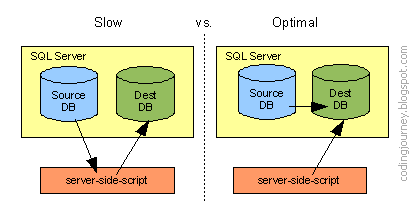
You need to obtain data from one data source to process and store in another. You don't want your server-side-script to use two connection objects and be the slow middle-man between them, as in the diagram on the left.

Slow with two SQL Server connections and scripting vs. Optimal with only one connection.


Solution

If both data sources are databases on the same MS SQL Server, it's a piece of cake to do optimally with just one connection object and pure T-SQL.

Just do the following:
  1. Set up Security - Add the user of the destination database as a user of the source database with at least db_datareader access.

  2. Prefix foreign tables with Schema - In your SQL that writes to the destination-database, prefix all tables housed in the source(foreign)-database with their "fully qualified" position in the schema to indicate which database they reside in, as illustrated in the example below.

    Example
    Table tblSource is from of the ForeignDB database, but tblDestination is from the active database.
    insert into tblDestination (colA, colB)
    select col1, col2
    from [ForeignDB].dbo.tblSource

Thursday, October 23, 2008

Zinc COMPort Phone Dialer Freezes

Background

A photo of the building directory kiosk and phone handset which uses my application built with Flash and Zinc.The same touch-screen kiosk I previously wrote about requires phone dialing capabilities since the purpose it serves is a Building Directory in the lobby of a government office building.

I used MDM Zinc because I can retain all source code in Actionscript (Flash), yet utilize the computer's modem to dial phone numbers via the Zinc COMPort API (whose phone numbers are retrieved from an MS SQL database via Zinc's ODBC API).

At the start of this project while evaluating Zinc as an option, the first thing I did was create a phone dialer prototype using Flash and Zinc to prove it would work. It worked perfectly. But when integrating it into the system at the tail end of the project and adding some robustness to it, I ran into a hitch that caused the Zinc-compiled application to crash.

Problem

In order to gracefully recover should the modem throw a "No Carrier" or "No Dialtone" error, I wanted to hang-up the line then alert the user of this error. However, when invoking the hang-up immediately when Flash is asynchronously notified, the Zinc-compiled application freezes indefinitely.

Example
Part of the constructor of my PhoneDialer AS3 class
mdm.COMPort.onCOMPortData = function(e:Object)
{
   var data:String = StringUtil.trim(e.data);

   logger.logLine("onCOMPortData() - timeCode: " +
      e.timeCode + ", data: " + data + ".");

   if (data == "NO CARRIER")
   {
      hangUp(); //freezes here

      dispatchEvent(new PhoneDialerEvent(
         PhoneDialerEvent.NO_CARRIER));
   }
   else if (data == "NO DIALTONE")
   {
      hangUp(); //freezes here

      dispatchEvent(new PhoneDialerEvent(
         PhoneDialerEvent.NO_DIALTONE));
   }
   else if (data == "OK")
   {
      //Dial was successful!
      dispatchEvent(new PhoneDialerEvent(
         PhoneDialerEvent.OK));
   }
};

Method in my PhoneDialer class:
public function hangUp()
{
   if (!pickedUp)
      throw new AlreadyHungUpException();

   logger.logLine("Closing COMPort.");

   mdm.COMPort.close(); //actually freezes here

   pickedUp = false;
}


Solution

The solution was to not invoke mdm.COMPort.close() within the onCOMPortData handler. Instead, I alert the user of the error which also instructs him/her to click the Cancel button on the Dialing screen. Then the cancel button invokes hangUp(), which works without a hitch.

Also one other item of interest: even though Zinc was designed to support Actionscirpt 3, the first line of code above, mdm.COMPort.onCOMPortData = fuction(... triggers a warning when compiling to SWF - "Warning: 1072: Migration issue: Class is not a dynamic class. Instances cannot have members added to them dynamically." Since this is just a warning, it does not cause any problems during run-time, but it's interesting that they did not switch to use the standard addEventListener method of event-handling that has been implemented as a standard across AS3 components.

Conclusion

In a perfect world, this error would never happen if the kiosk were always connected to the phone line and the phone line were to always provide a dial tone. But since those are possibilities, the application is now robust because it properly recovers from those scenarios instead of crashes.

Thursday, October 16, 2008

SharedObjects - "Cookies" that Don't Go Away

Flash SharedObjects are an easy way to preserve application state on the client-side between sessions.

I have used them for Flash CD-ROM applications that need to persist data on the user's local machine and for Flash web applications that needed a "cheap local database".

But Flash SharedObjects pose a serious privacy problem for anyone who may have access to your computer.

Privacy Problem

The default Flash Player settings give 100KB of local data storage to any SWF from any web site or Flash application.

One may expect that since Flash Player runs in the context of a web browser, that when you tell your web browser to clear its cache, cookies, or other private data, that it will also remove the Flash Player SharedObject data - at least the ones added via your active web browser.

Unfortunately, that is not the case - Flash Player keeps all of your SharedObjects until you explicitly remove them.

See for yourself - on a Windows XP machine browse to this folder (Folder #1):

C:\Documents and Settings\<Your Username>\Application Data\Macromedia\Flash Player\#SharedObjects\<Random Letters and Numbers>\

You may be surprised to see that folder is filled with the domain-names of every web site you have ever visited that contained a Flash file that persisted some data.

There is also another folder that houses more SharedObject data (Folder #2):

C:\Documents and Settings\<Your Username>\Application Data\Macromedia\Flash Player\macromedia.com\support\flashplayer\sys\


So how do you remove these SharedObjects and how do you prevent them from getting there in the first place?

Solutions

To remove your existing Shared Objects, follow these steps:
  1. Delete existing SharedObjects

    Go to the Website Storage Settings Panel of the Flash Player Settings Manager (yes, the manager is on a website, not within software). Move the slider down to "None".

    This removes all files from the Folder #1 (above), but for some reason does not remove from the second folder.

  2. Delete Contents of Folder #2

    Since the previous step did not empty Folder #2 (above), you need to manually delete the contents of that folder.
To prevent future SharedObjects from being saved on your system in the future, you can do this globally for all web sites using the Global Storage Settings manager.

Or set your SharedObject storage settings on a site-by-site basis by doing this:
  1. Right-click on a visible Flash object in a web page.
  2. Click settings.
  3. Click on the tab with the "folder" icon - Local Storage.
  4. Use the slider to change the data limits for that particular web site.

    Wednesday, October 15, 2008

    Zinc Crashes on Select from Database

    Background

    I'm using Zinc 3 as a wrapper around a Flash 9 / ActionScript 3 application for a touch-screen kiosk that requires database and comport access.

    Problem

    The Zinc application crashes when calling mdm.Database.ADO.getData() to obtain the results of a query (either SELECT or stored procedure) executed by mdm.Database.ADO.select() IF the query produces an empty result set. I'm connecting to a MS SQL Server 2005 database, but this issue probably happens with any ADO connection.

    Example
    mdm.Database.ADO.select(sql); //if this results in 0 records...

    if (mdm.Database.ADO.error())
       throw("handle error here");
    else
       arr = mdm.Database.ADO.getData(); //crashes here

    Solution

    The undocumented but simple way to prevent the crash is: prior to calling getData(), you must first check ensure that getRecordCount() is not zero.

    Example
    mdm.Database.ADO.select(sql);

    if (mdm.Database.ADO.error())
       throw("handle error here");
    else if (mdm.Database.ADO.getRecordCount() == 0)
       arr = [];

    else
       arr = mdm.Database.ADO.getData();

    Conclusion

    Ideally Zinc would just return an empty array if no records were found, but since it doesn't, it's nice to know there is an easy fix. I am content with minor problems like this because the benefits Zinc offers - including access to databases and the comport directly from Actionscript - far outweighs the bugs it has.

    trace("Hello World!");

    I finally decided to start a blog to record lessons learned from the trials & tribulations along my journey of coding for a living, with the hope that these solutions will save even just one headache for one fellow coder.

    This blog will focus mainly on Flash ActionScript 2 and ActionScript 3 but will cover anything related such as Zinc, JavaScript, SQL, XML, or anything else that causes me grief but results in a helpful solution.

    About the Author
    My name is Ricky Blaha. I am a senior programmer for ICS Learning Group in Severna Park, Maryland, USA, as well as a freelance programmer doing business as Interstellar Multimedia -- both concentrating in the multimedia, web-development, and e-learning arenas.

    Coding professionally since 1999, my journey started with ColdFusion 4.5 with Oracle and XHTML, CSS and JavaScript. It later evolved into ASP3 development with SQL Server, then some PHP with mySQL. Then in 2002 the opportunity arrived to learn and use Flash 5 and Actionscript 1, and ever since, developing CD-ROMs, touch-screen kiosks, e-learning applications, and web applications with Flash have been my major focus and greatest source of enjoyment.

    In 2008 I decided to back up my experience to become an Adobe Certified Flash MX 2004 Developer. In Fall 2009 I will finally complete my BS in Computer Science with a minor in Strategic and Entrepreneurial Management from UMUC.